
使用php实现一个简单的文件、图片管理器
最近项目需求需要一个图片管理器,用作编辑数据时可以直接选择图片,所以就写了个简单的文件管理器,最终想要实现
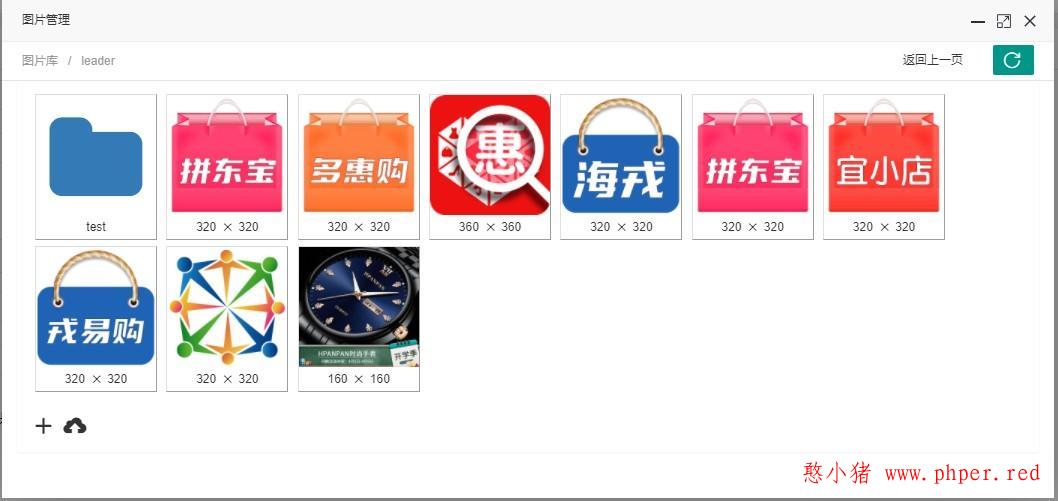
直接上代码好了,下面是获取当前目录下的文件、文件夹列表
/**
 * 获取当前目录下的内容
 * @param string $marker
 * @return array
 */
public function getDirectoryContents(string $marker = '')
{
    // TODO: Implement getDirectoryContent() method.
    $curr_full_path = $this->getCurrFullPath();
    // 1、首先先读取文件夹
    $temp = scandir("." . $curr_full_path);
    //遍历文件夹
    $dirs = $files = [];
    foreach ($temp as $item) {
        $complete_path = $curr_full_path . $item;
        if (is_dir("." . $complete_path)) {
            if ($item == "." || $item == "..") {
                continue;
            }
            $dirs[] = [
                "type" => "folder",
                "path" => "{$this->curr_path}{$item}/",
                "name" => $item,
            ];
        } else {
            $info = $this->getFileInfo("." . $complete_path);
            $files[] = [
                'type' => $info['type'],
                'path' => $complete_path,//不带域名
                'name' => $item,
                'info' => $info,
            ];
        }
    }
    return array_merge($dirs, $files);
}
获取顶部面包屑:
/**
 * 获取当前目录的面包屑
 * @param string|null $filter_path 过滤该目录前的路径 eg:image/
 * @return array
 */
public function getCrumbs(?string $filter_path = null)
{
    $curr_path = $this->curr_path;
    $old_nodes = array_filter(explode('/', $curr_path));//原始路径节点
    $old_node_count = count($old_nodes);// 原始路径节点数
    if (!empty($filter_path)) {
        $curr_path = mb_substr($curr_path, (stripos($curr_path, $filter_path)));// 截取掉过滤路径前的部分
    }
    $nodes = array_filter(explode('/', $curr_path));//获得新的路径节点
    $node_count = count($nodes);//获得新的路径节点数
    $list = [];
    $j = 0;
    foreach ($nodes as $k => $node) {
        $list[$j]['name'] = $node;
        $list[$j]['path'] = '';
        $item = $old_node_count > $node_count ? $k + ($old_node_count - $node_count) : $k;
        for ($i = 0; $i <= $item; $i++) {
            if ($old_node_count > $node_count) {
                $list[$j]['path'] .= $old_nodes[$i] . '/';
            } else {
                $list[$j]['path'] .= $nodes[$i] . '/';
            }
        }
        $j++;
    }
    // 当存在过滤的情况下,可以将过滤的目录也卸载掉(比如:商家后台媒体根目录是"shop/shop_1234/",
    但实际"shop/shop_1234/"目录不需要展示在面包屑上)
    $filter_path_key = substr($filter_path, 0, strlen($filter_path) - 1);
    if (!empty($list) && $filter_path_key !== false && $list[0]['name'] == $filter_path_key) {
        unset($list[0]);
    }
    return array_values($list);
}
创建目录:
/**
 * 创建目录
 * @param string $name 目录名称
 * @return array
 * @throws Exception
 */
public function createFolder(string $name)
{
    $curr_full_path = $this->getCurrFullPath();
    $directory = $curr_full_path . $name;
    if (is_dir("." . $directory)) {
        return ['type' => 'folder', 'path' => $this->curr_path . $name . '/', 'name' => $name];
    }
    $res = mkdir('.' . $directory, 0755, true);
    if ($res) {
        return ['type' => 'folder', 'path' => $this->curr_path . $name . '/', 'name' => $name];
    }
    throw new \Exception("创建目录失败", 10000);
}
上传文件(上传视频或者较大的文件不建议采用这样写法,可以采用分片处理(推荐)或者put上传):
// 上传单个文件
public function upload()
{
    $_file = $_FILES;
    if (empty($_file)) {
        throw new Exception("请上传文件");
    }
    //处理存储目录
    $directory = $this->getCurrFullPath();
    try {
        //创建目录
        if (!is_dir('.' . $directory)) {
            if (!mkdir('.' . $directory, 0755, true)) {
                throw new \Exception("创建目录失败");
            }
        }
        foreach ($_file as $item) {
            if ($_FILES["image"]["error"] !== UPLOAD_ERR_OK) {
                throw new Exception("上传图片时出错:{$_FILES['image']['error']}");
            }
            $ext = pathinfo($item["tmp_name"])['extension'];
            if (!empty($this->ext)) {
                if (!in_array($ext, $this->ext)) {
                    throw new \Exception('上传失败,上传格式不支持');
                }
            }
            $info = $this->getFileInfo($item["tmp_name"]);
            if ($this->max_upload_size > 0 && ($item["tmp_name"]["size"]) > $this->max_upload_size) {
                $max_size = sprintf("%.2f", ($this->max_upload_size / (1024 * 1024)));
                throw new \Exception("上传失败,文件大小超过{$max_size}M");
            }
            $basename = bin2hex(random_bytes(8));
            $filename = sprintf('%s.%0.8s', $basename, $ext);//文件名称
            $save = $directory . $filename;//保存地址
            $res = move_uploaded_file($item["tmp_name"], '.' . $save);
            if (!$res) {
                throw new \Exception("上传失败");
            }
            return [
                'status' => true,
                'msg' => '上传成功',
                'data' => [
                    "type" => $info['type'],
                    'path' => $save,
                    'name' => $filename,
                    'info' => $info
                ]
            ];
            break;
        }
    } catch (Exception $e) {
        throw new \Exception($e->getMessage(), $e->getCode());
    }
}
删除:
/**
 *
 * @param string $path
 * @return bool
 */
public function remove(string $path)
{
    if (strrpos($path, "/") !== false) {
        if (strrpos($path, "/") == (strlen($path) - 1)) {
            $curr_full_path = $this->root_path . $path;
            if (is_dir("." . $curr_full_path)) {
                $dh = opendir("." . $curr_full_path);
                while ($file = readdir($dh)) {
                    if ($file != "." && $file != "..") {
                        $fullpath = $curr_full_path . $file;
                        if (!is_dir($fullpath)) {
                            unlink($fullpath);
                        } else {
                            $this->remove($fullpath);
                        }
                    }
                }
                closedir($dh);
                if(rmdir("." . $curr_full_path)) {
                    return true;
                } else {
                    return false;
                }
            }
        } else {
            if(@unlink($path)){
                return true;
            }else{
                return false;
            }
        }
    }
    return false;
}
其他相关的代码:
/**
 * 获取当前完整相对路劲
 * @return string
 */
protected function getCurrFullPath()
{
    return $this->curr_full_path = $this->root_path . $this->curr_path;
}

protected function getFileInfo($file)
{
    $info['type'] = "file";
    $info['size'] = sprintf("%.2f", filesize($file) / 1024);//kb
    if (function_exists("finfo_open") && function_exists("finfo_file")) {
        $res = finfo_open(FILEINFO_MIME_TYPE);
        $mime = finfo_file($res, $file);
        // 文件暂时只支持辨别image类型
        if ($mime !== false || stripos($mime, "image/") == 0) {
            list($info['width'], $info['height']) = getimagesize($file);
            $info['type'] = "image";
        }
    }
    return $info;
}调试:
$path = "supplier/supplier.1/test/"; // 以针对性目录,调用者根目录为"/supplier/supplier.1/"为准做调试.
$filter = "supplier.1";// 模拟平台下的商户只拥有指定"supplier.1"目录及子目录访问权限;平台可忽略该变量,则可在"upload/images/"下全部可管理
// 创建对象
$management = new LocalManagement('upload/images/', $path);// 本地文件管理器
获取面包屑:
// 获取面包屑
var_dump$(management->getCrumbs($filter));
// 打印结果
array(1) {
  [0]=>
  array(2) {
    ["name"]=>
    string(4) "test"
    ["path"]=>
    string(25) "supplier/supplier.1/test/"
  }
}
获取目录下的内容:
var_dump$(management->getDirectoryContents());
// 打印结果
array(2) {
  [0]=>
  array(3) {
    ["type"]=>
    string(6) "folder"
    ["path"]=>
    string(40) "/upload/images/supplier/supplier.1/test/"
    ["name"]=>
    string(4) "test"
  }
  [1]=>
  array(4) {
    ["type"]=>
    string(5) "image"
    ["path"]=>
    string(56) "/upload/images/supplier/supplier.1/0e38b2520594235a.jpeg"
    ["name"]=>
    string(21) "0e38b2520594235a.jpeg"
    ["info"]=>
    array(4) {
      ["type"]=>
      string(5) "image"
      ["size"]=>
      string(5) "31.69"//kb
      ["width"]=>
      int(997)//px
      ["height"]=>
      int(295)
    }
  }
}
创建目录:
var_dump$(management->createFolder('name'));
// 打印结果
array(3) {
  ["type"]=>
  string(6) "folder"
  ["path"]=>
  string(25) "supplier/supplier.1/name/"
  ["name"]=>
  string(4) "name"
}
上传文件:
var_dump$(management->upload('name'));
// 打印结果
array(3) {
  ["status"]=>
  bool(true)
  ["msg"]=>
  string(12) "上传成功"
  ["data"]=>
  array(4) {
    ["type"]=>
    string(5) "image"
    ["path"]=>
    string(55) "/upload/images/supplier/supplier.1/c4b30547f1390249.png"
    ["name"]=>
    string(20) "c4b30547f1390249.png"
    ["info"]=>
    array(4) {
      ["type"]=>
      string(5) "image"
      ["size"]=>
      string(6) "174.34"
      ["width"]=>
      int(512)
      ["height"]=>
      int(512)
    }
  }
}本文上传、管理暂针对本地存储,后续有空将更新上传至阿里云的OSS上面,各位如果感兴趣的话也可以根据本文进行更改,需要对getDirectoryContents、upload、remove方法进行调整;下载资源中已附上上传管理阿里云OSS
源码下载:




版权声明:本文由“憨小猪”发布,如需转载请注明出处。

